
Woodo · Guides · Guide
Woodo Guide — Beginner Tips and a Scene-by-Scene Walkthrough
A Woodo guide for new players: how the diorama pieces fit, the rules that carry through every scene, a beginner walkthrough order and time-saving tips.
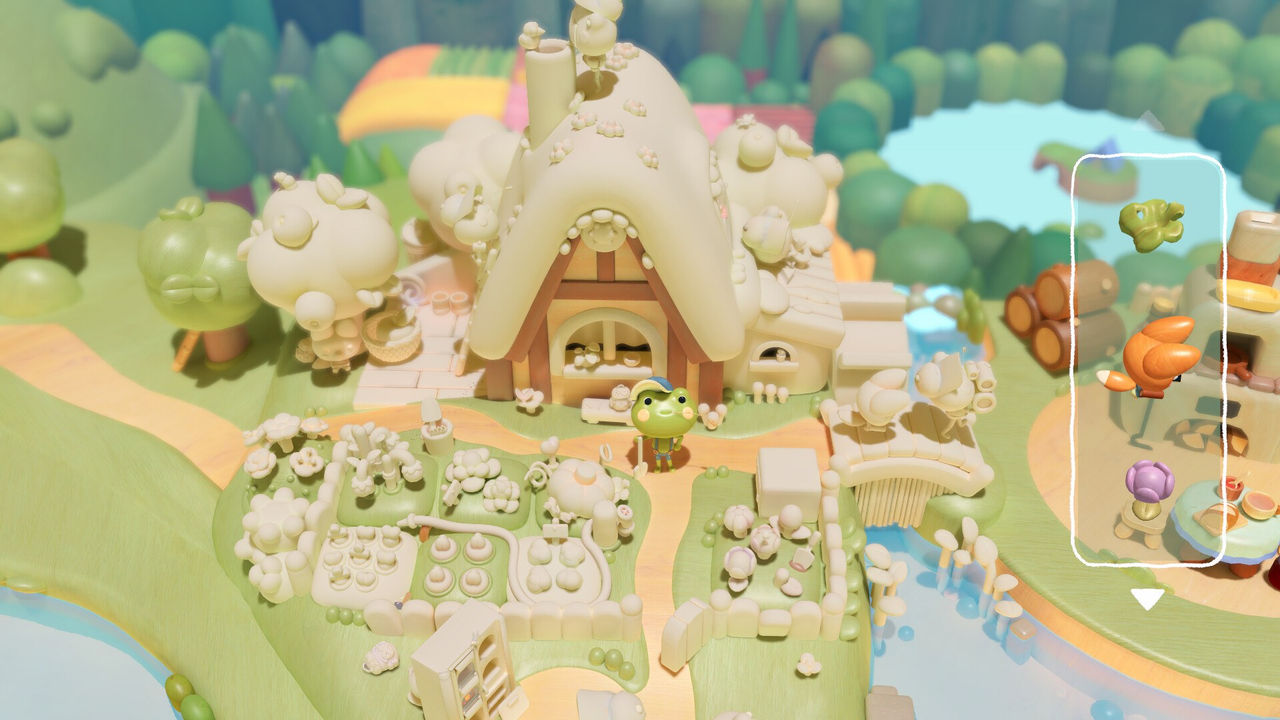
Woodo is a diorama-building game where you place relevant blocks across several scenes in the past, and the memory of the protagonist is revealed gradually as you visit more places. That is how the community walkthrough describes it, and it is a good frame for this Woodo guide: each scene is a memory you rebuild by matching wooden pieces to empty spaces, and the story arrives as the picture fills in.
This guide focuses on the part that actually trips new players up — how placement works, what the game expects you to notice, and the order things arrive in — rather than repeating the story. It draws on the published walkthrough, the Steam store's feature description and the official site.
What Kind of Guide Woodo Needs
Woodo is gentle by design. The official feature list says the game adapts to your pace and provides assistance when you need it, and reviewers describe the challenge as seeing what belongs where rather than solving hard logic. That means a guide for this game is mostly about habits and observation, not boss strategies or build orders.
| Question | Short answer | Where the answer comes from |
|---|---|---|
| How hard is it? | Low difficulty; the hint system can point you straight to the spot | Nintendo Life review |
| Can you rotate pieces? | No — you rotate the scene instead | Community walkthrough |
| Are there hidden pieces? | Yes; some appear only when you zoom in or open something | Steam description |
| How long is it? | About four hours by one community estimate (to confirm) | Steam Community |
| Is there a photo mode? | Yes, the in-game camera drives several achievements | Steam Community, achievements |
| Do you need to 100% it? | No, but the collectibles and photos are missable without direction | Community guides |

The Rules That Carry Through Every Scene
The walkthrough repeats the same handful of principles scene after scene, which is why they are worth learning once. In the opening level the floor pieces are matched by design like a jigsaw; some empty spaces are covered by other objects sitting on top, so you infer the piece from the remaining shape. Later scenes add the same logic at larger scale.
The core rules, in the order you meet them:
- Match shape and painted design together. Two pieces can be the same size; the painted detail on the block and the empty space tells them apart.
- Rotate the scene, not the piece. The toolbar does not let you spin a block, so you turn the diorama until the space and the piece line up.
- Clear the big pieces first. Putting large objects down early reduces toolbar clutter and exposes the small gaps.
- Expect composite objects. A flower is a petal piece plus a stem piece; characters are built from face, body, legs and clothing separately.
- Check behind and above. Some pieces are hidden behind objects, on shelves, or in areas you only see after zooming out and looking from above.
- Move on if a piece will not fit. As other pieces land, the remaining gaps narrow down and the answer often becomes obvious.
A Beginner Walkthrough Order
The walkthrough moves through the game in a fixed sequence, and following it stops you from hunting for pieces that the current scene has not handed out yet. The early scene order is:
- Starting Out — spell Woodo, then fill the wooden chest.
- A Memory — a room from the past, with floor, table and cabinet work.
- Foxy — the fox block and everything around her, plus hidden spaces behind.
- The Village — water plants, geese and a large outdoor scene with several sub-areas.
- The Dusty Den — many small pieces, a lamp puzzle and a key-and-chest chain.
- Ben — the frog's garden, where panning is introduced and used alongside zooming.
Mid-game the tone shifts with Conflict and The Change, then expands again through Adventure, Pirates and Hidden Island, before The Best Summer and Goodbye close the story. Hidden Island is the one to watch: it has both a daytime and a night-time state, and switching between them reveals different pieces and collectibles.
Tips That Save Time
Beyond the rules, a few practical habits make the game flow better. Zooming is not optional — many levels, The Dusty Den especially, are built around very small objects that only read clearly up close. If the camera is fighting you, reviewers note that a combination of the right stick and a held bumper helps, and touch controls work when the Switch is undocked.
Habits worth adopting early:
- Look at the scene from above for an overview before you start placing large items.
- Click nearby objects to centre the camera, then drag to sweep the area — the same trick the collectible guides recommend.
- Do not overlook wall and floor details, which is where several early pieces hide.
- Interact with everything. Some objects open, rotate or reveal key items, and several achievements depend on simply clicking the right thing.
- Revisit finished levels — replay is supported from the settings menu, and one achievement requires it.
For the collectibles specifically, the Woodo monk locations page lists all ten hidden Tiny Monks scene by scene, and the Woodo all achievements page covers the photo targets and the rest of the 24 unlocks. If you want the level list without the placement detail, the Woodo chapters page answers how the story is structured, and the Woodo gameplay page explains the core loop in more depth.
FAQ
- What is the Woodo guide about?
- It covers how to play Woodo (the cozy diorama puzzle game from Tiny Monks Tales) from the opening prologue onwards: where to start, the piece-placement rules that repeat in every scene, the order the scenes come in, and the habits that stop you getting stuck.
- Where does Woodo start?
- You begin by spelling out the word Woodo, placing blocks that match the lines between the O shapes. The next task is filling a wooden chest by matching the detailing on each block to its empty place, which teaches the match-the-shape, match-the-design habit used for the rest of the game.
- Do you need a walkthrough to finish Woodo?
- Not strictly. Nintendo Life notes the difficulty never gets too far off the ground and the hint system will tell you exactly where to look, and reviewers describe Woodo as relaxing rather than testing. A walkthrough is most useful for the hidden collectibles and the photo achievements.
- How should I handle a piece that will not fit?
- Rotate the scene rather than the piece, since the toolbar does not let you spin objects. Zoom in and hold the piece near likely gaps, then move on to other pieces if you are still stuck, because the remaining spaces narrow down and the scene clarifies as it fills in.
- Does Woodo have a hint system?
- Yes. The official feature list says the game adapts to your pace and offers assistance when needed, and a September 28, 2026 patch improved object visibility and hint cameras in select levels. Steam also lists adjustable text size, colour alternatives and a mouse-only option.
More in Guides
More guides pages in Woodo.
References
- Woodo: Guides, Tips, And Walkthrough
- Woodo Game Guide: Mastering Dioramas, Discovering ...
- Woodo on Steam
- Woodo | Cozy game
Facts on this page are compiled from the references above. Items marked "to confirm" are single-source and not yet verified.